
If you sell food products, condiments, or ingredients, searching for “how to add recipe pages to Shopify” is one of the smartest things you can do.
Recipe pages do more than just share cooking inspiration, they drive visibility and sales for the products. By offering shoppable recipes, you directly reach home cooks, chefs, and food enthusiasts, and guide them seamlessly from “I want to make this” to “Add to cart.”
In this post, we share the best, easiest, and most profitable ways to create recipe content in Shopify.
What are recipe pages in Shopify?
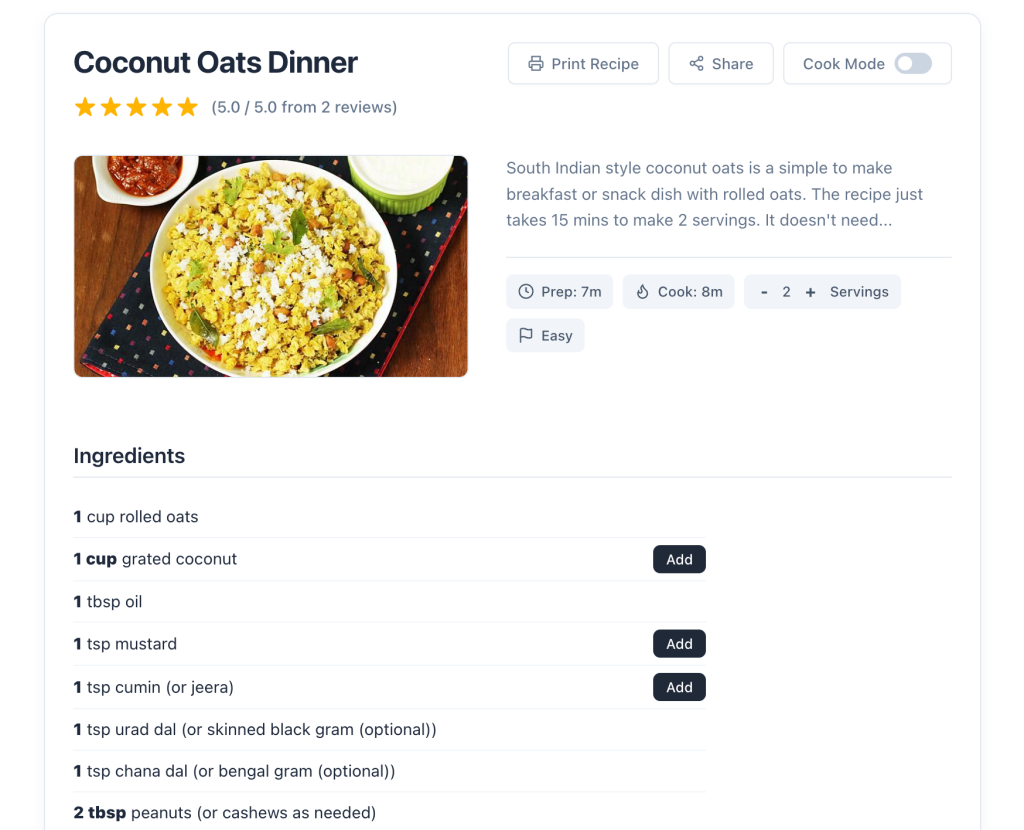
Recipe pages are specialized layouts that display ingredients, cooking instructions, cook time, and other information. They also offer features like checkboxes on ingredients and steps, add ingredients to cart options, and nutrition facts.
Unlike standard blog posts, they’re structured and are focused on visual experience for chefs and cooking enthusiasts.
For example:
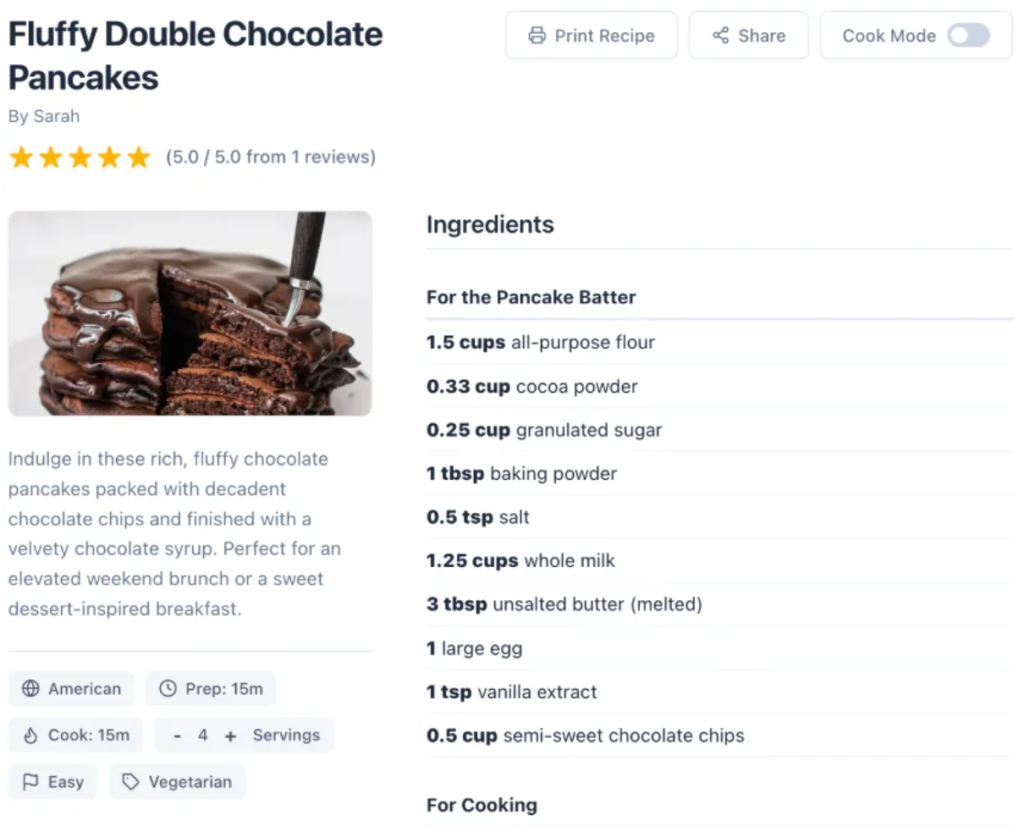
The main goal of recipe pages in Shopify is to drive traffic to the website through search engine rankings.
Key features of high-converting Shopify recipe sections
If you want your recipes to actually drive sales, your setup needs to include these non-negotiable features:
- Shoppable ingredients: Readers should be able to add your products to their cart directly from the recipe ingredient list with a single click.
- Recipe schema markup: This is critical for SEO. Schema markup tells Google exactly what your page is (a recipe), allowing your content to display rich snippets (like star ratings, cook times, and calorie counts) directly in search results.
- Cook-friendly layouts: When people cook, they use messy hands. Your recipe pages need to be mobile-optimized, easy to read, and ideally feature “keep screen awake” or step-by-step toggle functions.
- Nutrition info: Health-conscious consumers look for macros and dietary labels. Including this keeps them on your page longer and builds brand trust.
Options to create recipes in Shopify
The platform does not offer any native option to create recipe posts. There are two alternate ways to create recipe content in Shopify:
- Using KL – Recipe Studio: It’s an AI-powered app that helps you create beautiful recipe posts that are optimized for conversions and SEO. The app allows readers to add products (ingredients) to carts directly from the recipe pages. You also get detailed analytics of recipe performance on the store, including views and add to carts.
- Manually via coding: You can copy-paste ready-made HTML contents of recipe pages or create a custom layout for recipe posts in Shopify. But this method is not ideal for regular merchants to use; also it becomes difficult to manage recipes and make changes.
Because manually coding a recipe post is a massive drain on time and resources, in this post, we’ll focus exclusively on the easiest and most highly recommended option: using the KL – Recipe Studio, one of the best Shopify recipe apps.
Steps to create shoppable recipe posts in Shopify
Installing the KL – Recipe Studio app in your Shopify store. You can get started immediately with a free plan or a free trial.
Once installed, complete the quick onboarding steps: choose a specific Shopify blog (for e.g., “Recipes”) and add the Recipe App Block to your article template in the Shopify Theme Editor. This step is important for the app to work.
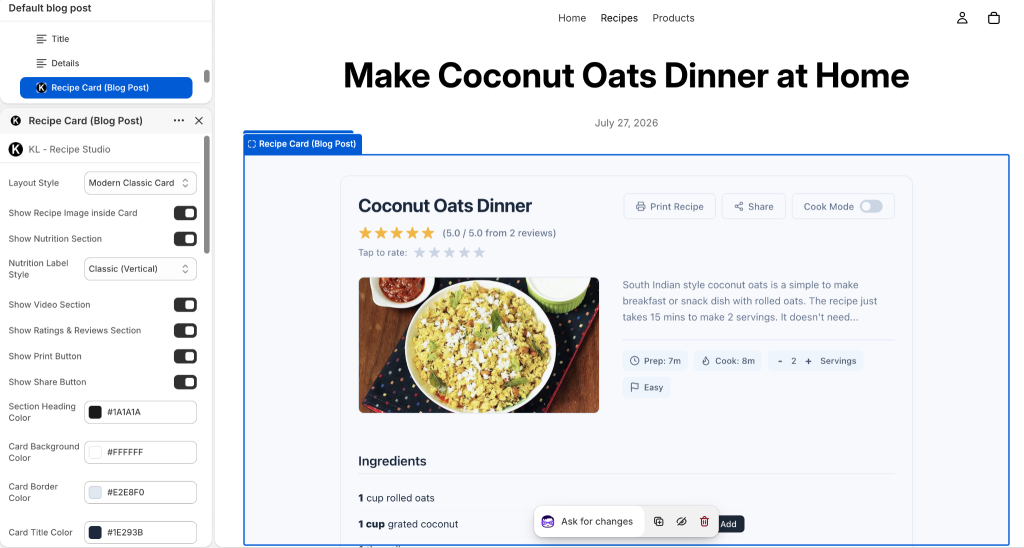
During this step, you can customize the layout and style of your recipe posts. The app offers three different, highly convertible layouts and various configuration options to match your brand.
2. Choose Your Creation Method
In the recipe studio app dashboard, go to Recipes and click to create a new one. Depending on your plan, you’ll get three powerful options:
- Create manually: Enter the recipe title, ingredients, steps, and other information directly into the UI.
- Import from URL: Use this option to import a recipe from other sites. You just need to enter a supported recipe URL and the app will import all the data.
- Generate with AI: Describe the recipe you want to create and the AI model will generate a fully structured recipe for you in a few seconds. This is helpful when you have recipe ideas in mind and want to draft content.
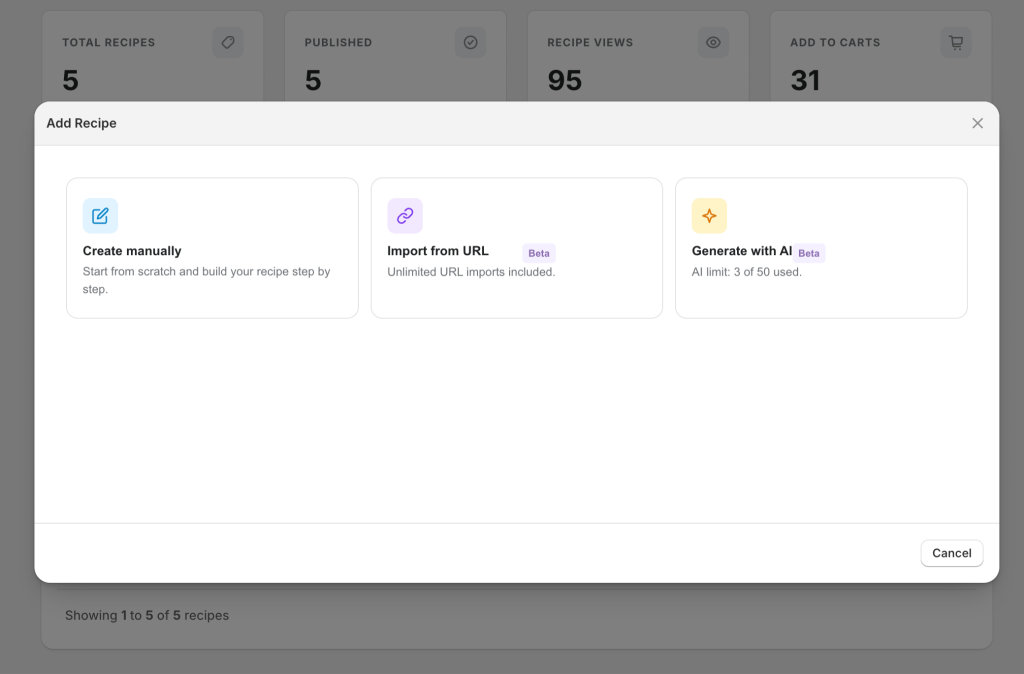
3. Configure the Recipe Details
Pick your preferred method and enter the editor. Here, you can set all the granular details: title, description, author, hero image, ingredients, steps, notes, difficulty level, and dietary labels.
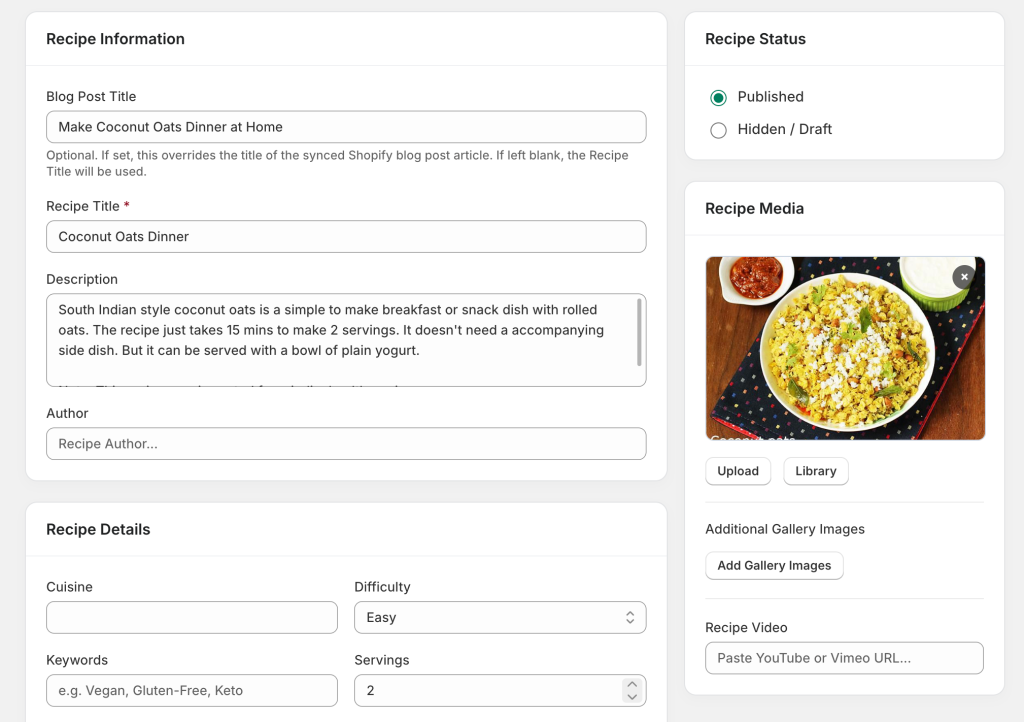
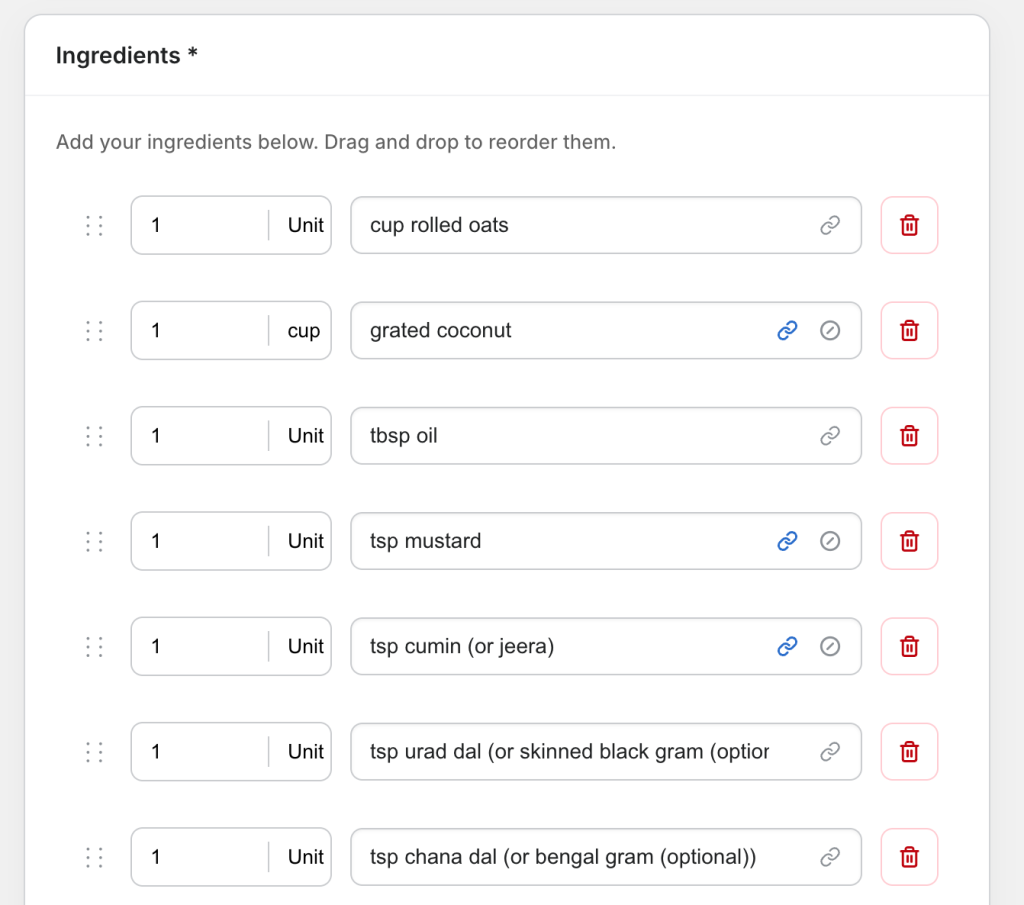
4. Link Ingredients to Products (Make it Shoppable)
This is where the magic happens. In the ingredients section, you have the option to map any ingredient to a specific product variant in your Shopify store.
When you link an ingredient to a product, an “Add to Cart” button is automatically generated next to that ingredient on the frontend. Behind the scenes, the app uses advanced background synchronization to ensure these links are lightning-fast and never slow down your store.
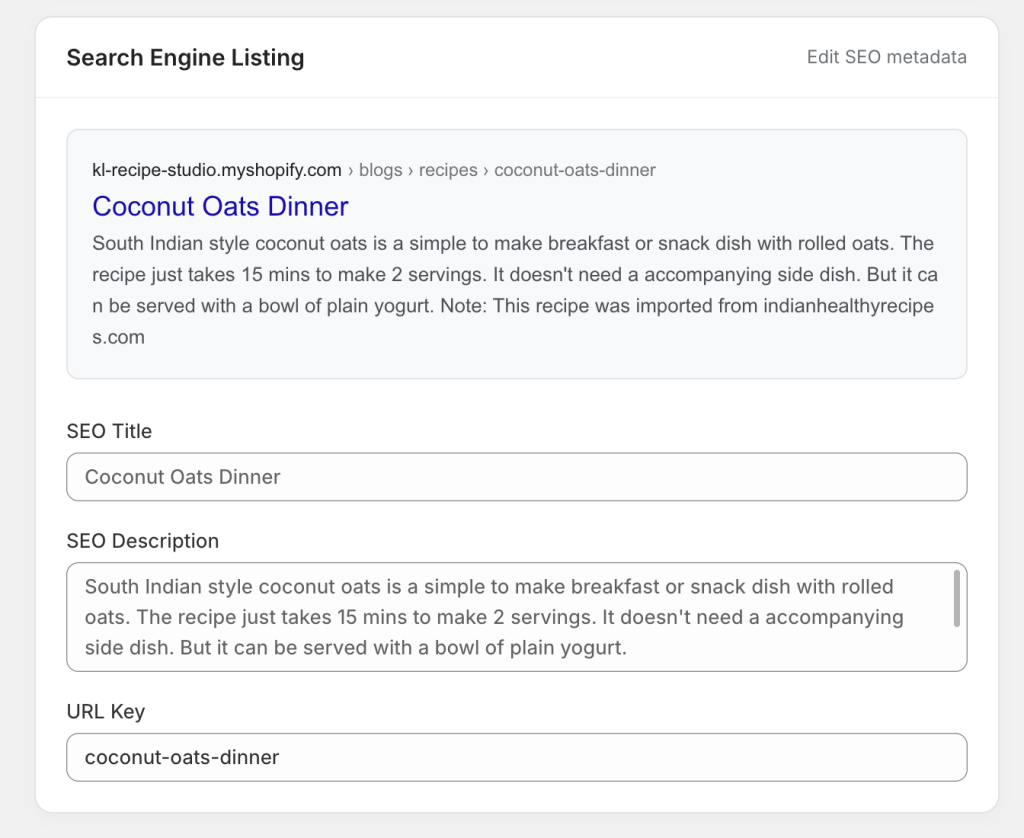
5. Optimize SEO and Publish
At the bottom, you can configure your SEO details, like title, meta description, and URL key. The best part is that the app automatically adds schema markup to the recipe based on details, guaranteeing you are optimized for Google rich results.
Once everything is configured, simply save the recipe and preview it on the frontend to see your new shoppable recipe in action.
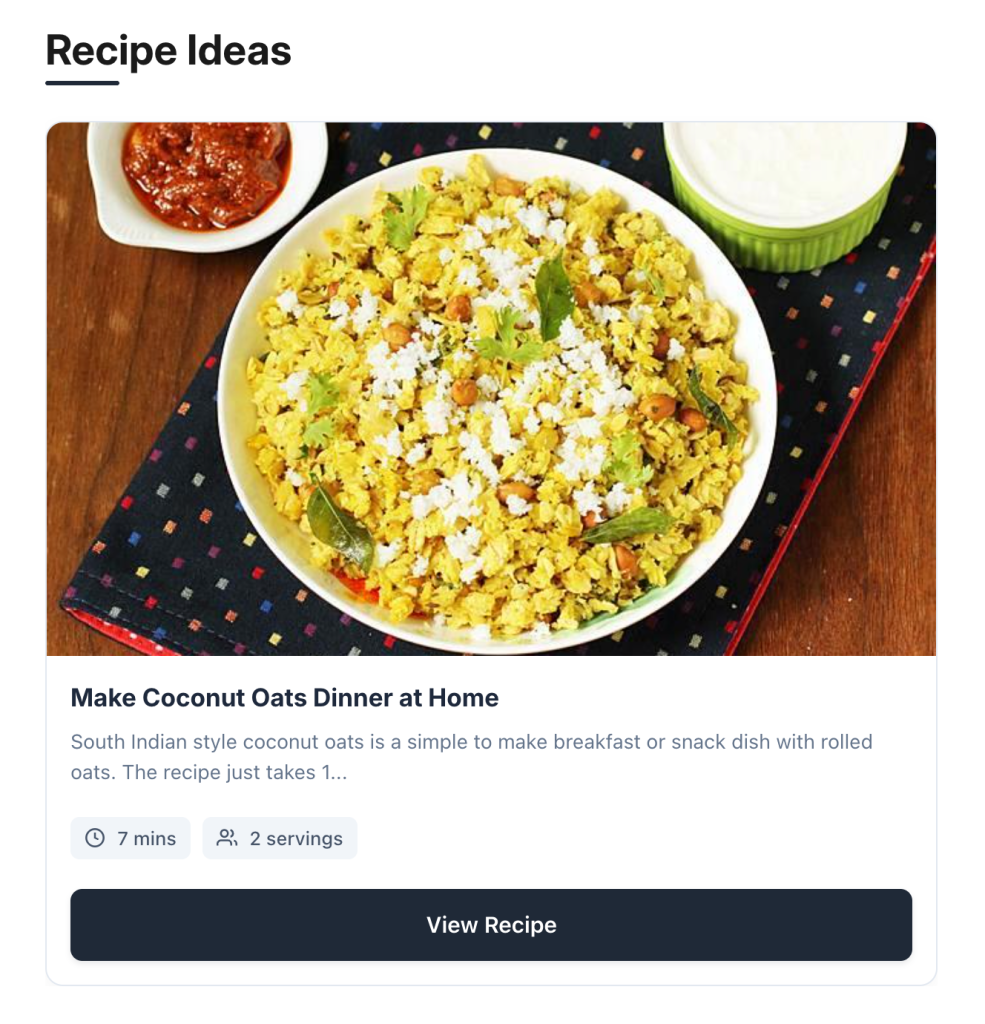
Bonus: Add a “Recipe Ideas” section on product pages
You can increase customer engagement on your website by showing “Recipe ideas” on the product pages. For example, if a customer is looking at a bottle of hot sauce, this block will dynamically display all the recipes that include that hot sauce as an ingredient.
To add this, simply go to your Theme Settings > Product Page > Add Section > KL Recipe Ideas block, and drag it to the region where you want it to appear.
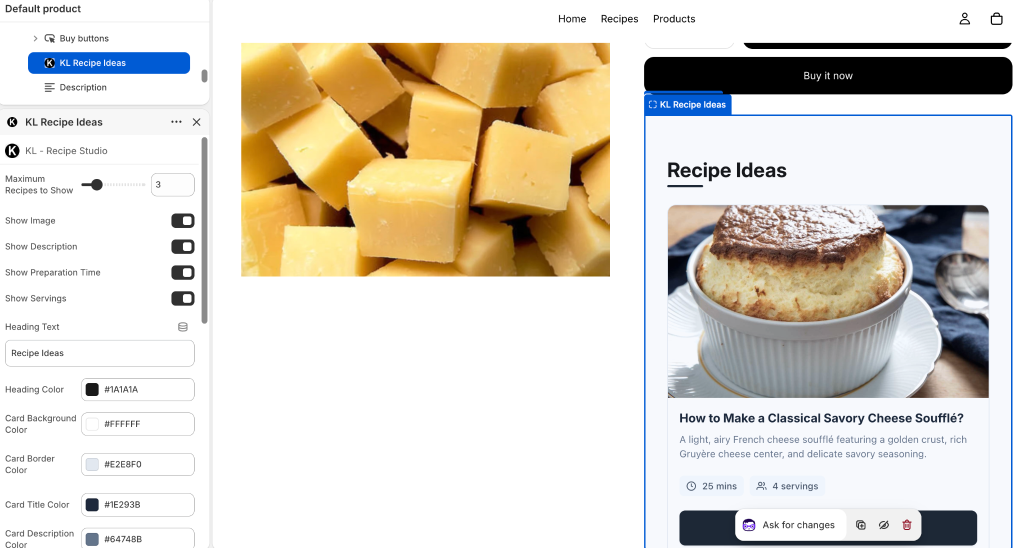
This cross-linking strategy engages visitors through inspiration and significantly increases the chances of conversion.
Key features of KL Recipe Studio app for Shopify
To summarize, here is why KL – Recipe Studio is the ultimate tool for food merchants:
- Optimized for rich snippets: Automatic, perfectly structured schema markup for higher Google rankings.
- Multiple creation options: Manual entry, URL import, and AI-generation to save you hours of work.
- Beautiful, configurable layouts: Cook-friendly, mobile-optimized designs that match your brand.
- True shoppable ingredients: Seamless product mapping with fast, cached “Add to Cart” functionality.
- Detailed analytics: Track impressions and add-to-cart clicks to see exactly which recipes are driving revenue.
FAQs
Can I manually create a recipe template in Shopify?
Yes, but it is not recommended for most merchants. Manually creating a recipe template requires editing your theme’s Liquid and JSON files to build custom sections. You would also need to manually code the JSON-LD schema markup and figure out how to link blog ingredients to product variants. It is highly technical, expensive if you hire a developer, and difficult to manage as your recipe library grows.
What is the best recipe app for Shopify?
KL – Recipe Studio is currently the best and most advanced recipe app for Shopify. Unlike basic blogging apps, it is specifically built for food commerce, offering shoppable ingredients, automatic schema injection, AI recipe generation, and dynamic product-page cross-selling.
How to sell food ingredients on Shopify?
The most effective way to sell food ingredients on Shopify is to stop just listing products and start selling the end result. By using shoppable recipe pages, you inspire your customers with meal ideas and remove the friction from buying. When they read a recipe and see an “Add to Cart” button right next to the ingredient they need, conversion rates skyrocket.
Can I create recipe pages without using the Shopify blog?
Technically, yes, by building custom page templates, but doing so means missing out on Shopify’s native blogging SEO benefits. The standard, most efficient practice, and the method used by KL – Recipe Studio, is to leverage Shopify’s native Blog engine, but completely override the standard blog layout with a specialized Recipe App Block. This gives you the SEO juice of a blog post with the advanced functionality of a dedicated recipe page.
Start creating Shopify recipes with KL Recipe Studio
Ready to turn your content into a revenue-generating machine? Stop losing sales to messy layouts and broken links.
Install KL – Recipe Studio today to build beautiful, SEO-optimized, shoppable recipes in minutes.