
If you run a food blog or sell culinary products online, you already know that getting your recipes to stand out on Google is incredibly difficult. Just writing a great recipe is no longer enough. To capture clicks in the highly competitive food niche, you have to speak Google’s language. That’s where Recipe Schema Markup comes in.
In this complete guide, we’ll break down exactly what recipe schema is, why it’s a non-negotiable SEO tactic, and how you can implement it on your website today.
What is recipe schema?
Recipe schema is a specific type of structured data (code) that you put on your website to help search engines explicitly understand the content of your page. By adding Recipe schema (developed by Schema.org), you provide a “cheat sheet” to Google, telling it exactly which text is the cook time, which is the calorie count, and which are the ingredients.
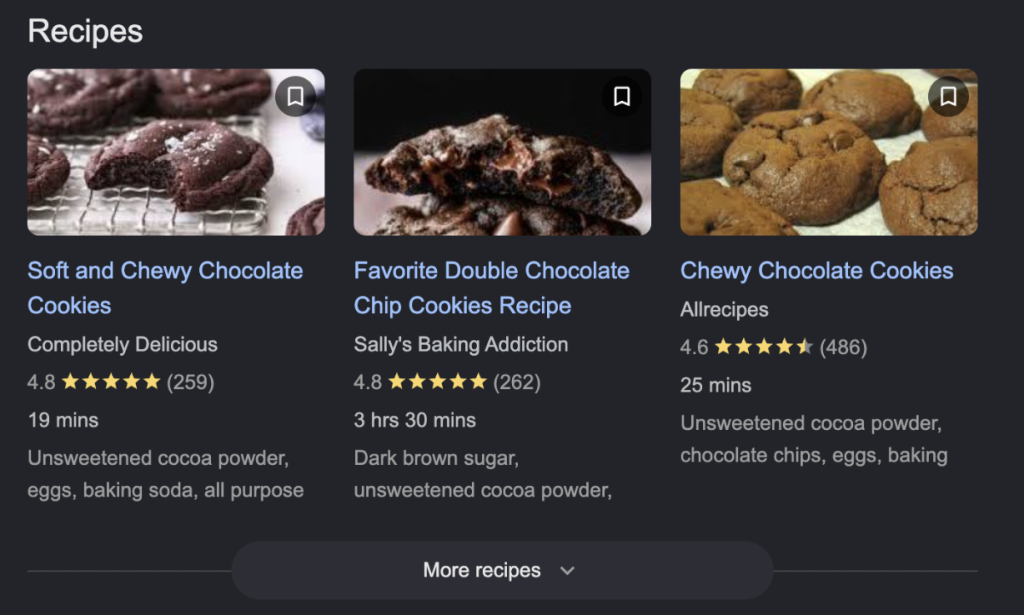
This makes the page eligible for rich results on Google, like this:
Generally, recipe schema is often used alongside:
- Recipe: The core data type for the recipe itself (ingredients, steps, nutrition).
- HowTo: Used for the step-by-step instructions if the page focuses heavily on a specific cooking technique.
- ItemList: Used when a page features a collection or list of multiple recipes (e.g., “Top 10 Summer Dinner Recipes”).
Benefits of using recipe schema markup
Adding recipe schema to your pages unlocks massive Shopify recipe SEO and marketing advantages:
- Eye-Catching Rich Snippets: Instead of a plain blue text link, your search result can display a mouth-watering image, star ratings, cook time, and calorie count directly on the Google search page.
- Higher Click-Through Rates (CTR): Rich snippets take up more visual space on the Search Engine Results Page (SERP) and provide immediate answers. This naturally draws the user’s eye and drastically increases the likelihood of them clicking your link over a competitor’s.
- Voice Search Optimization: Smart speakers (like Google Home and Amazon Alexa) heavily rely on structured data to find and read off recipes to users. If you want your recipe read aloud, schema is required.
- Increased Organic Traffic: Higher CTRs send positive signals to Google, which can lead to higher rankings and a compounding increase in organic traffic over time.
Important properties of recipe schema
To get the most out of your structured data, Google rewards the use of specific properties. These are divided into required and highly recommended fields:
| Required Properties | name: The name of the dish.recipeIngredient: A list of the ingredients required.recipeInstructions: The steps to make the recipe. |
| Highly Recommended Properties (Needed for Rich Snippets) | description: A short summary of the recipe.author: Who created the recipe.image: A high-quality image of the finished dish.prepTime, cookTime, totalTime: The time it takes (formatted in ISO 8601 duration).recipeYield: How many servings the recipe produces.nutrition: Caloric and macronutrient information (calories, fatContent, proteinContent, etc.).aggregateRating: The average user rating (e.g., 4.5 stars).video: A video demonstrating the recipe. |
Example of recipe schema markup code
Google recommends using the JSON-LD format for structured data because it is the easiest to implement and maintain. Here is what a basic recipe schema snippet looks like:
{

  “@context”: “https://schema.org/”,

  “@type”: “Recipe”,

  “name”: “Classic Chocolate Chip Cookies”,

  “author”: {

    “@type”: “Person”,

    “name”: “Jane Doe”

  },

  “description”: “A quick and easy recipe for soft, chewy chocolate chip cookies.”,

  “image”: “https://yourwebsite.com/images/chocolate-cookies.jpg”,

  “prepTime”: “PT15M”,

  “cookTime”: “PT12M”,

  “totalTime”: “PT27M”,

  “recipeYield”: “24 cookies”,

  “recipeIngredient”: [

    “2 ¼ cups all-purpose flour”,

    “1 cup butter, softened”,

    “¾ cup white sugar”,

    “2 eggs”,

    “1 cup chocolate chips”

  ],

  “recipeInstructions”: [

    {

      “@type”: “HowToStep”,

      “text”: “Preheat oven to 375 degrees F (190 degrees C).”

    },

    {

      “@type”: “HowToStep”,

      “text”: “In a large bowl, mix flour, baking soda, and salt. Set aside.”

    }

  ],

  “nutrition”: {

    “@type”: “NutritionInformation”,

    “calories”: “150 calories”

  }

}
How to implement recipe schema markup in your website?
If you are manually managing your website, you can implement the schema in three straightforward steps.
Step 1: Generate JSON-LD code
You can write the JSON-LD code manually, but it is prone to syntax errors. Instead, use a free Schema Markup Generator tool (like Merkle). Choose the “Recipe” type, fill in the form fields with your recipe data, and the tool will generate the JSON-LD code for you.
Step 2: Implement in page
Copy the generated code block. Log into your website’s CMS (like WordPress, Webflow, or custom HTML), and paste the code into the <head> section of your specific recipe page.
Alternatively, you can paste it right before the closing </body> tag.
Step 3: Validate schema markup
Before publishing, you must ensure Google can read your code without errors. Go to Google’s Rich Results Test and paste your live URL. The tool will tell you if the recipe schema is valid and eligible for rich snippets. Fix any red errors before moving on.
FAQs
Does recipe schema guarantee rich results on Google?
No. Implementing a valid recipe schema makes you eligible for rich results, but it does not guarantee them. Google’s algorithms still evaluate the overall quality of your content, your site’s authority, and user engagement metrics before awarding a rich snippet.
What are the required fields for recipe schema markup?
To avoid Google validation errors, you must include the name, recipeIngredient, and recipeInstructions properties. However, if you want to actually unlock the visual rich snippets (like images and times), you need to add the recommended fields like image, prepTime, and recipeYield.
Can I use recipe schema without a recipe blog post?
Technically, yes, but it is highly discouraged. Google’s guidelines state that structured data should accurately represent the primary content of the page. If you put recipe schema on a standard product page that doesn’t feature a full recipe, Google may ignore it or issue a manual spam action against your site.
How do I add a recipe schema in Shopify without coding?
If you use Shopify, manually injecting code into your blog templates is tedious and risks breaking your theme. The easiest way is to use a dedicated recipe app like KL – Recipe Studio. It automatically generates and injects flawless, Google-compliant JSON-LD schema into the background of your blog posts whenever you create a recipe—zero coding required.
Can I reuse the same recipe schema on multiple pages?
No. You should never duplicate the exact same structured data across multiple URLs. This is considered duplicate content by search engines and can get your rich snippets removed. Each recipe schema must be unique to the specific recipe page it lives on.
Bonus: Create SEO-optimized recipes in Shopify
If you are a Shopify store owner selling food, beverages, or kitchenware, manually coding JSON-LD for every recipe is a massive waste of time and resources. You need a solution that handles the technical SEO while you focus on selling products.
KL – Recipe Studio is built exactly for this. When you create a recipe inside the app, it automatically generates perfect, Google-compliant Recipe Schema markup behind the scenes and injects it into your Shopify blog posts.
Beyond just SEO, the app turns your structured data into a revenue engine by allowing you to map the ingredients in your schema directly to your Shopify product variants. This means customers reading your rich-snippet-optimized recipes can add your products to their cart with a single click.