
Publishing recipes on your Shopify store is one of the most powerful ways to drive organic traffic and sell more food products. However, simply hitting “publish” on a blog post with a list of ingredients won’t get you ranked in 2026.
The food and recipe niche is highly competitive. If you want search engines to choose your store over massive sites, you need a deliberate Recipe SEO strategy.
In this post, we share an easy, step-by-step guide to mastering recipe SEO in Shopify.
Benefits of optimizing recipes for SEO
Before the details, let’s understand why recipe SEO is important for food stores:
- Captures High-Intent Shoppers: People searching for “easy gluten-free pasta recipe” are already hungry and ready to buy ingredients.
- Secures Visual Rich Snippets: Recipes with schema markup allows your recipes to show images, star ratings, and cook times directly on Google’s search results page, stealing clicks from competitors.
- Increases Average Order Value (AOV): When a customer lands on your optimized recipe and sees “Add to Cart” buttons next to the ingredients, they buy multiple items at once instead of a single product.
- Builds Brand Authority: Ranking for culinary queries positions your brand as an expert in your specific food niche.
Things to optimize for recipes SEO in Shopify
To rank your recipes, you need to optimize both the visible content and the backend code. Here are the 7 critical elements:
1. Keywords
Don’t just target broad terms like “chicken recipe.” You will never rank.
Instead, focus on long-tail keywords that include your specific products, dietary restrictions, or cooking methods. Examples include “organic smoked paprika chicken thigh recipe” or “10-minute vegan smoothie bowl.”
Place your primary keyword in the recipe title, URL, and the first paragraph of your description.
2. Schema markup
Recipe schema markup is a piece of JSON-LD code that tells Google exactly what your page is about.
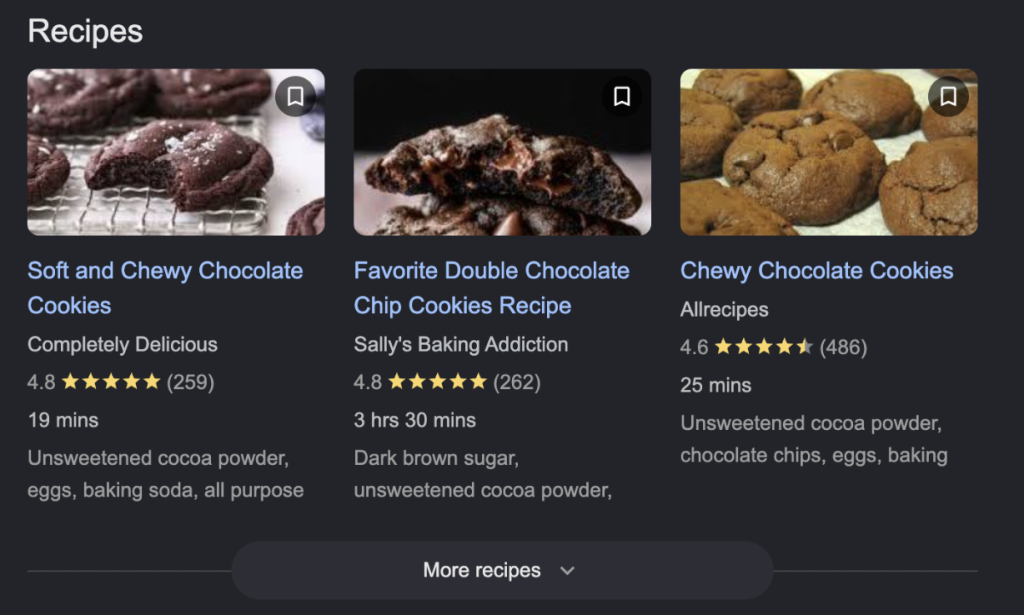
It feeds search engines your cook time, prep time, calories, ingredients, and ratings so they can display rich snippets. Without schema, you cannot get recipe rich results. Using KL – Recipe Studio app, the schema markup code is automatically added to recipe posts, so that you don’t need to do it manually.
3. Supporting content
Google’s algorithms love context. Don’t just list the ingredients and steps. Write a compelling introduction explaining why this recipe works. Add a “Chef’s Notes” section with substitution tips, storage instructions, or the history of the dish.
This supporting text helps Google understand the semantic meaning of your page and ranks you for secondary keywords.
4. Rich visuals
Food is a visual medium. Include a high-quality, mouth-watering hero image of the finished dish, plus step-by-step process photos.
Crucially, you must write descriptive Alt Text for every image (e.g., “Bowl of organic vegan ramen with tofu and green onions”). This helps your images rank on Google Images, which is a massive traffic source for food brands.
5. Interlinking
Internal links pass “link juice” and keep users on your site longer. You should strategically link your recipe pages to the specific product pages of the ingredients used. Conversely, on your product pages, link to recipes that feature that product.
This creates a closed-loop e-commerce ecosystem that boosts the SEO authority of both your products and your blog.
6. Nutrition data
Modern consumers are highly health-conscious, and so is Google. Include detailed nutritional information (calories, fat, protein, carbs) in your recipes. Not only does this satisfy user intent, but it also fills out required fields in your Recipe Schema markup, giving you a better chance at winning those rich snippets.
7. Mobile-friendly
Over 70% of users will read your recipe on their phones while standing in the kitchen. If your recipe isn’t mobile-optimized, meaning fast load speeds, large tap targets, and easy-to-read text without pinching and zooming, users will bounce immediately. Google uses mobile-first indexing, so a poor mobile experience will destroy your rankings.
Create SEO-friendly recipes with KL – Recipe Studio for Shopify
Doing all of the above manually, especially writing JSON-LD schema code for every single recipe, is incredibly tedious and prone to errors. The smartest way to execute Recipe SEO in Shopify is by using KL – Recipe Studio. The app handles the technical SEO heavy lifting for you. When you create a recipe in the app, it automatically generates and injects perfect Google-compliant Schema markup into your blog post.
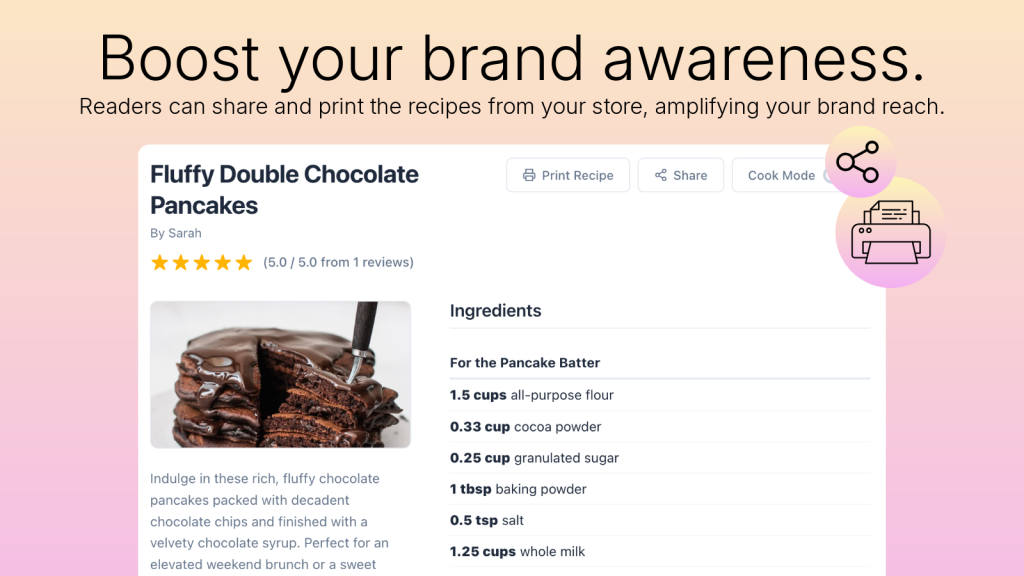
It also natively structures your nutrition data, optimizes images, and allows you to instantly turn your SEO-optimized content into shoppable experiences by linking ingredients directly to your Shopify product variants.
Instead of wrestling with code, you can focus entirely on creating great recipes while KL – Recipe Studio ensures they are perfectly optimized for Google’s 2026 algorithms.
FAQs
How to find recipe ideas to promote products?
Start with your best-selling products and reverse-engineer the content. If you sell artisanal hot sauce, brainstorm 5-10 meals where hot sauce is the star ingredient. You can also use the AI generation feature in KL – Recipe Studio, simply input your product name, and the AI will generate unique recipe ideas tailored to your brand.
What’s the best recipe app for Shopify?
KL – Recipe Studio is the best recipe app for Shopify because it is the only one built specifically for e-commerce SEO and conversions.
What keywords should I target for recipe SEO?
Target long-tail, highly specific recipe keywords. Focus on formats like:
- [Ingredient] + [Dish Type] + Recipe (e.g., “oat flour chocolate chip cookies recipe”)
- [Dietary Label] + [Dish] (e.g., “dairy-free creamy tomato soup”)
- [Time] + [Meal] (e.g., “15-minute weeknight shrimp stir fry”)
Should I include FAQs in recipe pages for SEO?
Yes, absolutely. Adding an FAQ section at the bottom of your recipe is a brilliant SEO strategy. It allows you to naturally target long-tail question-based keywords (e.g., “Can I freeze this dough?”) and helps you capture spots in Google’s “People Also Ask” snippet boxes.
Why are my recipes not showing rich results on Google?
The most common reasons are missing or improperly formatted Schema markup, failing to include required properties (like an image or cook time), or having images that are too small. You can use Google’s Rich Results Test tool to diagnose exactly what is missing from your code.
Summary: Improve your recipe rankings
Ranking recipes on Shopify in 2026 requires a perfect blend of culinary content and technical SEO. By targeting the right long-tail keywords, adding structured schema markup, interlinking your products, and optimizing for mobile users, you can successfully compete with major food publications. To skip the coding and automate this entire process, start using KL – Recipe Studio today to turn your blog into an SEO-powered sales engine.